 MeterFlow
Start here: the big picture
MeterFlow answers one question for your product: “who used how much of what — and what does that cost them?” Everything in the dashboard exists to serve that question.
user-842 or an email).How the pieces connect
Why are some “Create” buttons greyed out?
Every dialog disables its confirm button until all required fields (marked with *) are filled — e.g. “Create plan” stays disabled until the plan has a Name. If a button looks stuck, check for an empty required field above it.
New organization container
The outermost container — usually your company. Everything else (projects, meters, plans…) lives inside an organization. You got one automatically when you registered.
📍 Dashboard → the “New organization” button (also offered on first login, when you have none yet)
- Name *
Your company or team name. Purely a label — you can change it later.
- Billing email
Where invoices and billing notices for your MeterFlow account would go. Optional; format is validated, but nothing is sent to verify it.
finance@acme.dev. Their two products will become two projects inside it.New project container
One project = one product or environment you want to meter. Every meter, plan, API key, customer balance and usage event belongs to exactly one project — projects never see each other’s data.
📍 Dashboard → the “New project” button in the Projects table header
- Organization *
Which organization the project belongs to. Pre-selected if you already have one active.
- Name *
The product’s name, e.g. “PixelForge AI”. Shown across the dashboard and in the project switcher.
- Description
Free text for your own reference.
Generate API key access
The credential your application uses to talk to MeterFlow. Your backend passes it to the SDK; every usage event, credit operation and subscription call is authenticated — and scoped to one project — by this key.
📍 Open a project → API Keys → the button in the table header
- Key name *
A label so you remember where the key is used — “Production backend”, “Staging”, “CI tests”. Has no technical effect.
- Environment
Live keys start with
mf_live_, Test keys withmf_test_— and they access two fully separate datasets inside the same project. Subscriptions, credits and usage created with a Test key are invisible to Live keys (and vice versa), while your meters and plans are shared, so tests always run against your real billing configuration. Use Test keys for development, staging and CI; Live keys only for real production traffic.
mf_live_a1b2… once, and put it in your server’s environment variables: new MeterFlow({ apiKey: process.env.METERFLOW_KEY }). The dashboard list will forever show only the prefix and the last 4 characters.Do test keys share my MeterFlow plan’s limits?
No, test mode has its own. Test events get a tenth of your MeterFlow plan’s monthly allowance — Drip 5 000 · Flow 20 000 · Stream 70 000 · Torrent 400 000 — and never count toward the live one; event packs raise only the live allowance. Past it (plus the same 10 % grace as live), test usage writes are refused with a 403. Test keys make up to 60 requests a minute, live keys 300. Test data expires: test usage events after 30 days, and a test subscription with no usage for 90 days, together with that customer’s test balance and ledger. Your organization’s Billing page and Usage dialog show this month’s test events against that allowance, beside the live ones.
New meter core concept
A meter is a named counter definition: it declares one thing in your product worth measuring, and how raw events should be turned into a number. Think of it as creating a new column in a usage report before any data exists.
📍 Open a project → Meters → the button in the table header
- Name *
The human-friendly label shown in the dashboard — “Images generated”, “Video render seconds”. For people’s eyes only.
- Event name *
The machine key — and yes, it is stored in the database and matched exactly. When your application reports usage, it sends an event name; MeterFlow looks up the active meter in that project whose
event_nameis an exact, case-sensitive match. If none exists, the event is rejected with a 404 error (“No active meter found for event …”) and nothing is recorded. Each event name is unique within a project. Convention: lowercase dotted, e.g.image.generated. - Aggregation type
How many individual events get combined into one number in usage summaries. See the table below — this is the heart of the meter.
- Aggregation field
Required for Sum, Max, Min and Unique count; refused on Count, which reads no property. It names a property of your events. For Sum, Max and Min it is where the quantity comes from when your app leaves
valueout — a meter whose field issecondsreadsproperties.seconds; avalueyour app sends always wins, and an event with neither counts as 1. For Unique count it is the property whose distinct values are counted —model, to count the models a customer used. - Description
Free text for your team.
Aggregation types, by example
Suppose the customer user-842 triggers 4 events this month with values 3, 10, 2, 10. One number is reported per meter — which number depends on the aggregation type:
| Type | Question it answers | Result for 3, 10, 2, 10 | Typical use |
|---|---|---|---|
| Count | How many times did it happen? (values ignored) | 4 | Images generated, API calls, exports |
| Sum | How much in total? | 25 | Seconds rendered, tokens consumed, GB transferred |
| Max | What was the single largest? | 10 | Peak concurrent jobs, largest upload |
| Min | What was the single smallest? | 2 | Rarely billing — mostly diagnostics |
| Unique count | How many distinct values of the aggregation field appeared? | 3 (3, 10, 2) | Distinct models used, distinct documents touched |
video.rendered · Aggregation Sum · Aggregation field seconds.Your app finishes rendering a 42-second clip for
user-842 and reports the event video.rendered with value 42. Do that a few times and the customer’s usage page shows one line: Video render seconds — 3 events — 117.
Does the event name have to match what my app sends? What happens on a typo?
Yes — exactly, including case. The meter’s event name is stored in the database and acts as the address label for incoming events. If your app sends video.render but the meter says video.rendered, the API answers 404 “No active meter found for event 'video.render' in this project” and the event is not stored. This is deliberate: a silent typo would leak un-billed usage forever. Create the meter first, then start sending events with the same name.
Can I change the aggregation type later?
No — after creation only the name, description and active flag are editable. The aggregation defines what the stored history means, so changing it retroactively would rewrite the past. If you need different maths, create a new meter with a new event name.
When is “Aggregation field” required?
It depends on the type. The form shows it only for Sum, Max, Min and Unique count, and the server refuses a create that leaves it empty for those. On a Count meter the form hides it and the server refuses one if it is sent: a count reads no property, so the field would name something nothing reads.
New plan core concept
A plan is a pricing tier — “Free”, “Pro $29/month”… It bundles a recurring price with a set of meter limits that say how much of each metered feature is included and what happens beyond that. Customers are attached to a plan through a subscription.
📍 Open a project → Plans → the button in the table header
- Name *
The tier name — “Free”, “Pro”, “Enterprise”. Required; the Create button stays disabled until it’s filled.
- Description
Free text, e.g. the marketing one-liner for the tier.
- Price / Currency / Billing period
The recurring subscription fee: Price is the amount (0 is fine for a free tier), Currency a code like
USD, and Billing period how often it recurs — monthly, yearly, weekly, or one-time. Fixed after creation — editing a plan later cannot change these (create a new plan instead, so existing subscribers’ terms don’t silently change). - Trial days
Free days at the start of each new subscription. With
14, a new subscriber spends 2 weeks in a “trialing” status before the paid period starts.0= no trial. - Published
Whether the plan exists for your customers at all. Left off it is a draft: you can set the price, the limits and the feature keys over several sittings and your API keys never see it — it is absent from the SDK’s plan list, a plan id that leaked answers
404, and nobody can be subscribed to it. New plans are published; switch it off to prepare one in peace and on when it goes on sale. Switching it off again later closes the door to new subscribers without touching the ones already on it. - Features
The on/off perks the plan includes — short keys you invent, like
ssoorpriority-support(lowercase letters, digits,-and_). Your app asks the SDKentitlements.check(customerId, 'sso')and gets yes only for customers on a plan that lists the key. Editable at any time, on new and existing plans; for things you count use a meter limit below instead.
Meter limits — the “+ Add limit” section
Each limit row connects this plan to one meter and answers: how much of that thing is included, and what happens beyond it?
- Meter *
Which measured thing this limit applies to. The dropdown lists the meters you created in this project — nothing more, nothing less. It is not a fixed catalogue: any new product capability just needs a new meter first, and it appears here immediately.
- Included units
The allowance bundled into the plan’s price, per billing period. “Pro includes 500 images a month” →
500. On a Hard or Soft row a figure is required before the plan can be created — a blank allowance would cap nothing — unless you tick Unlimited below to say that is what you meant. On a Metered row a blank is its own answer: pay-as-you-go from the first unit. - Unlimited
Only on Hard and Soft rows, and the explicit way to say “no cap on this meter”. Ticking it switches Included units off and empties it; leaving it off keeps that figure required. Metered rows have no switch, because there a blank already means something.
- Overage rate
The price in credits per unit once the customer goes past the included units —
0.5means each extra unit costs half a credit from their balance. It belongs to the Metered type only: the form asks for it on a Metered row and hides it on Hard and Soft, and the API refuses a rate on a Hard or Soft row (422). A Metered row with neither included units nor a rate would refuse every unit, so the API refuses that row too (422). - Limit type
What the SDK’s
entitlements.check()answers once the included units are used up — the call your app makes before doing the work. Hard (block) —check()answers no (hard_limit_reached) and your app refuses the action; the customer hits a wall until the next period or an upgrade. Soft (warn) —check()still answers yes, flaggedsoft_limit_exceeded, so your app lets it through and nudges the customer to upgrade. Metered (charge) —check()answers yes while the customer’s credits cover the extra units, and each extra unit is charged from their balance at the overage rate; when the balance can’t cover it, the answer is no (insufficient_credits). Metered is the “pay-as-you-go” option and the only one that moves money (credits) by itself. A Metered limit is refused on a Max or Min meter (422): a highest or lowest value cannot be billed by the unit. On a Metered row, a spend cap on the customer’s subscription can makecheck()answer no before the balance runs out (spend_cap_reached). Hard and Soft both fire thelimit.reachedwebhook once per billing period, the first time the line is crossed. In every case MeterFlow keeps recording the events your app sends — the gate ischeck(), in your code.
USD · Monthly · 14 trial days · Published ✓Limit 1: meter Images generated, included 500, type Hard → after 500 images,
check() answers no and your app stops generating until next month or an upgrade.Limit 2: meter Video render seconds, included 1 000, overage 0.02, type Metered → past 1 000 seconds, every extra second silently costs 0.02 credits from the customer’s wallet.
Why is “+ Add limit” greyed out?
Because the project has no meters yet — a limit is always a cap on a meter, so with zero meters there is nothing to attach it to. The dialog shows the hint “Create meters first to attach limits to this plan.” Go to Meters → New meter, create at least one, then reopen this dialog.
Why does the Meter dropdown only show a few options? What if my product has something new?
The dropdown is simply your own meters for the currently selected project. In the demo data those are “Images generated”, “Video render seconds”, “Upscales processed”, “Peak GPU memory” and “Active prompters” — but that list is yours to grow. It does not restrict what customers can do: customers never pick meters; you define meters for whatever your product does. New feature tomorrow? Create a meter for it and it shows up here.
A customer is past a Hard limit — why do their events still get recorded?
Because MeterFlow never decides for your product what a user may do — your app does, by calling entitlements.check() before the action. A Hard limit makes that call answer no; if your app skips the call and does the work anyway, the usage event is still accepted and stored, so your history and any metered charge stay honest. Think of the limit as the rule and check() as the bouncer at the door: MeterFlow writes the rule, your code stands at the door.
What does check() answer when MeterFlow is down?
From meterflow 0.10.0 (npm) / 0.5.0 (PyPI), the SDK keeps answering. It reuses each answer for the 15 seconds the API allows, and a usage record, grant or deduct for a customer makes that customer’s answers stale. If MeterFlow cannot be reached — a network error, a timeout, or a 5xx or 429 after the retries — check() gives the last answer, marked stale: true; with none, the default you set per feature in entitlementDefaults ('allow' or 'deny', '*' for the rest), with reason: 'offline_default'; with neither, it throws. Your onError hook hears about it first. A 401, 403, 404 or 422 is a real answer and is never covered up.
Why can’t I edit price or limits on an existing plan?
By design: existing subscribers signed up under those terms, so price, currency, billing period and meter limits are frozen at creation. Editing a plan can change its name, description, trial days, published state, active flag and feature keys only. To reprice, create a new plan (e.g. “Pro 2026”) and move new customers onto it.
New subscription links customer ⇄ plan
A subscription attaches one of your customers to one plan. From that moment their usage is judged against that plan’s meter limits. In production your backend usually creates this via the SDK the instant someone picks a tier at checkout — the dialog does the same by hand.
📍 Open a project → Subscriptions → the button in the table header
- Customer ID *
Your own identifier for the end customer — any string you choose: a user ID from your database (
user-842), an email, a tenant slug. MeterFlow never validates it against anything; whatever you send is who the subscription belongs to. Use the same ID everywhere (subscriptions, credits, usage) or the pieces won’t connect. - Plan *
Which pricing tier they’re on — the dropdown lists this project’s plans. If the plan has trial days, the subscription starts in “trialing”; otherwise “active”.
user-842 clicks “Upgrade to Pro” in your app → your backend calls subscriptions.create({ customer_external_id: 'user-842', plan_id: … }). Every usage event from user-842 is now checked against Pro’s limits.What if a customer has no subscription — are their events lost?
No. Events are always stored and always show in usage summaries. Without an active or trialing subscription nothing is charged, and entitlements.check() answers no with no_subscription — so an app that asks first will not let the action through. Billing logic switches on the moment a subscription exists.
Can I cap what one customer spends in a period?
Yes — set spend_cap, in credits, on the subscription through the SDK or the API; empty means no cap. Once the period’s spending reaches it, recorded usage stops taking credits, a credits.deduct() past it is refused with a 409, entitlements.check() answers no with spend_cap_reached before a metered action would cross it, and the cap.reached webhook fires once for the period.
A customer canceled — can they come back?
Yes, on the same subscription. Set its status back to active — subscriptions.update(id, { status: 'active' }), or Reactivate on its row. If the old period has ended a fresh one starts now, with the plan’s period credits granted; a trial canceled before its end resumes as a trial. A plan switched off or unpublished since takes nobody back (409), and a subscription your payment-provider connector manages comes back through the provider, not here.
Can I find one customer’s subscription in a long list?
Yes. The Subscriptions page has a customer filter and status chips, and the SDK takes the same two: subscriptions.list({ q, status }). q matches any customer ID that contains it; status is one of active, trialing, past_due, paused, canceled or expired. The server filters before it cuts the page, so every page holds only matches. In the SDK from meterflow 0.9.0 (npm) / 0.4.0 (PyPI). From 0.12.0 / 0.7.0 it also takes sort — created_at (the default), customer_external_id or status — and order, desc or asc; pass the same two with each next_cursor.
The customer page one customer, in full
Every customer your app has written something for — a subscription, a credit balance or a usage event — is a row on the Customers page. Open one and their page holds the whole story: who they are, the plan they are on, and four tabs.
📍 Open a project → Customers → the customer’s row
- Credits
Their balance and every ledger line behind it, with Grant and Deduct — the dialogs explained below.
- Usage
What they used, meter by meter.
- Subscription
The plan they are on and its status, with Cancel or Reactivate.
- Entitlements
What their plan grants, feature by feature: what is left of each metered allowance, and the reason a feature is refused, exactly as
entitlements.check()would give it.
Grant / Deduct credits the wallet
Credits are a prepaid balance per customer (per project) — think of a wallet or top-up card. You decide what one credit is worth in your pricing. Metered overage draws from this wallet automatically; the two dialogs move credits by hand.
📍 Open a project → Customers → the customer’s row → Credits tab → “Grant” / “Deduct”
- Amount *
How many credits to add (Grant) or remove (Deduct). Must be greater than zero — the direction is decided by which button opened the dialog, not by a minus sign.
- Description
An optional memo stored on the ledger entry — “Welcome bonus”, “Refund for outage”, “Support goodwill”. Your future self will thank you.
user-842 gets a Grant of 100 (“Welcome bonus”). They render 2 500 video seconds on a plan with 1 000 included and 0.02 metered overage → 1 500 × 0.02 = 30 credits are deducted automatically. Balance: 70.Will this customer’s usage spend their balance?
Ask the balance: credits.balance() answers usage_draws_credits. true — their plan charges usage beyond its allowance, so recorded usage takes credits by itself. false — only an explicit credits.deduct() ever moves it. null — they have no active or trialing subscription.
Can my app top a customer up automatically?
MeterFlow tells your app when and how much; your app charges the customer, then grants the credits. Give a webhook endpoint a low balance threshold and it receives balance.low when a customer’s balance drops below it — from a deduction or from metered usage — and balance.topped_up when a grant lifts it back over. Set topup_amount on the customer’s subscription and balance.low carries it as suggested_topup. Set max_topups_per_window and a grant beyond that many in one period is refused with a 409, so a loop in your code cannot keep topping up.
Can I hold credits for a long job?
Yes, from meterflow 0.11.0 (npm) / 0.6.0 (PyPI). credits.reserve() holds part of a customer’s balance for ttl_seconds — 5 minutes unless you say otherwise, a day at most. The balance does not move, but nothing else can spend what is held: a credits.deduct(), metered usage, a check() that would charge and another hold all see only the available credits, the balance less what is held. When the job ends, credits.confirmReservation(id, { amount }) takes all or part of the hold as one ordinary ledger deduction and frees the rest, and credits.releaseReservation(id) frees all of it; a hold you forget frees itself when it expires. credits.balance() shows reserved and available beside the balance, and held credits count against a spend cap too.
Show your customers their balance
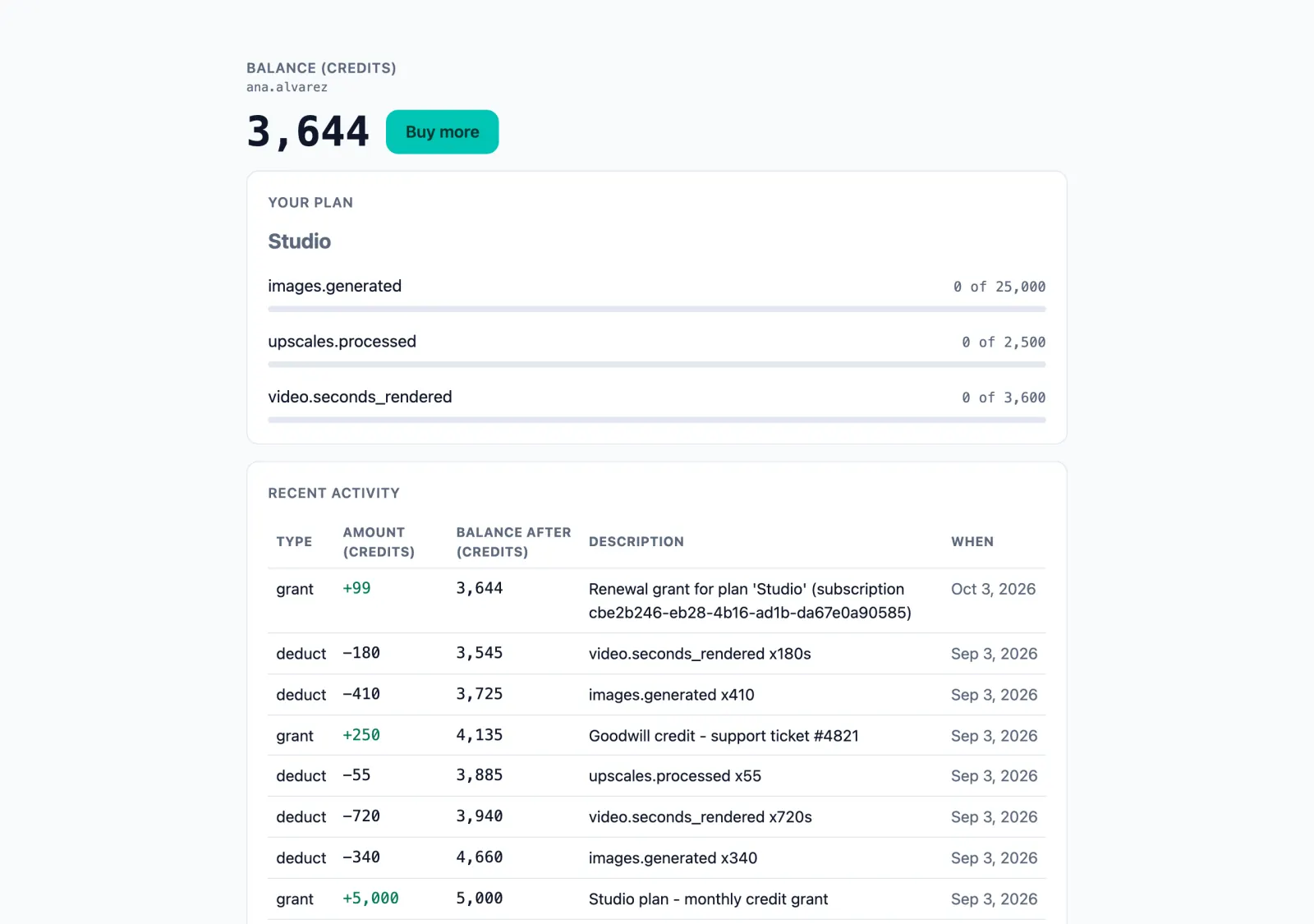
MeterFlow hosts a page that shows one of your customers their own credits: the balance, the recent ledger lines behind it, the plan they are on with what is left of each metered allowance, and anything they used outside the plan. You don’t build or host it — your server hands the customer a link.
link.url. The link carries its own short-lived token, so your API key never leaves your server. In Python it is client.portal.create_session(…), with the same fields. const link = await client.portal.createSession({
customer_external_id: 'user-842',
topup_url: 'https://acme.dev/billing',
return_url: 'https://acme.dev/app',
expires_in_minutes: 60,
}); 3. Buy more opens topup_url — your own checkout page, exactly as you typed it, with nothing added. It is optional: with no topup_url, on the link or in the project’s defaults, the page has no Buy more button. ← Back goes to return_url, optional in the same way. 4. MeterFlow never takes the payment: when your checkout reports one, your server calls credits.grant() and the page shows the new balance. - The link
Lasts 60 minutes unless you set
expires_in_minutes— 24 hours at most — and cannot be withdrawn before then. It opens one customer’s page, read only: it cannot change anything or show another customer. A link made with a test key (mf_test_…) shows test data, under a Test data badge. - Your look
Open a project → Portal: your company name, logo, light / dark / auto theme, colours and corner radius, and the default Buy more URL, Back URL and link lifetime for links that leave them out. One tick applies the look to every project of the organization.
- A link by hand
On the Customers table, the Create a portal link row action makes a link for that customer without any code — so does Portal link on their Credits tab.
Record usage event core concept
One usage event = “this customer just did this thing, this much.” In production your application sends these through the SDK automatically, thousands of times a day; the dialog exists so you can inject one by hand for testing and demos.
📍 Open a project → Usage → look up a customer → “Record event”
- Event name *
Must exactly match the event name of an existing, active meter in this project (case-sensitive). That match is how MeterFlow knows which counter this event feeds. No matching meter → the API rejects the event with a 404 and nothing is stored. Check the Meters page for the exact spelling.
- Customer ID *
Which of your customers did it — same free-form ID string used for subscriptions and credits. Consistency is everything:
user-842andUSER-842are two different customers. - Value
The quantity — optional. Left out, a Sum, Max or Min meter reads it from the event property its aggregation field names (your app sends it under
properties), and otherwise the event counts as1. Its meaning depends on the meter’s aggregation: for a Count meter the value is ignored (each event counts as one occurrence); for Sum it’s the amount to add (42 seconds, 1 300 tokens); for Max/Min it’s the measurement being compared; a Unique count meter counts the distinct values of its aggregation field.
video.rendered → “Video render seconds”. 2. The event is stored permanently (raw — aggregation happens later, at reading time). 3. In the background, MeterFlow checks whether the customer has an active subscription and whether that plan has a limit on this meter. 4. If the limit is Metered, the units past the included allowance are charged at the overage rate from the customer’s credit balance and a ledger line is written — up to the subscription’s spend cap for the period, if it has one; if it is Hard or Soft and this event is the first to cross the included units this period, the limit.reached webhook fires once. The event is never refused here — refusing is check()’s job, in your app. 5. The usage summary you see on this page recomputes from the raw events using the meter’s aggregation type.
I recorded an event and got an error — why?
Almost always the event name: it doesn’t exactly match any active meter in this project. The error says so verbatim — “No active meter found for event '…' in this project.” Copy the event name from the Meters page rather than retyping it. Also note meters are per-project: a meter in another project doesn’t count.
If my app retries a request, will the event be double-counted?
Not when using the SDK properly: every write accepts an idempotency key — a unique tag for “this particular action”. If the same key arrives twice (a retry after a network hiccup), MeterFlow recognises it and returns the original result instead of storing a duplicate. The manual dialog doesn’t send one, so pressing Record twice by hand does create two events.
Do I need one event per API call?
No — and you usually shouldn’t. Value is a quantity, and a Sum meter adds those quantities up, so one event with a value of 1 300 is one event against your monthly plan allowance and 1 300 units on the meter. One event per API call is what burns through a plan: 1 000 users making 100 calls a day is roughly 3 million events a month.
Aggregate inside your own application over a window you could afford to lose if it crashed — one request, one job, one minute — then record a single event with the total. Sending them as a batch is not the same thing: a batch of 100 saves HTTP requests, but each event is still its own record and still counts.
This works for Sum meters. A Count meter ignores the value and counts occurrences, so there each occurrence does need its own event. Either way nobody’s bill changes: a Metered limit charges per unit.
Can I record usage that happened a while ago?
Only within five minutes. An event’s timestamp may be up to 5 minutes in the past and 60 seconds in the future; outside that window the API refuses it with a 422 and stores nothing. Leave timestamp out and the event is stamped with the time it arrives. Record usage as it happens: older usage cannot be loaded afterwards.
New webhook notifications
A webhook is a URL on your server that MeterFlow calls when something happens in your project — credits granted, a limit reached, a balance running low. Each call is signed, and retried when your server does not answer.
📍 Open a project → Webhooks → the button in the table header
- Endpoint URL *
Where MeterFlow sends the events, e.g.
https://api.acme.dev/meterflow. - Events to deliver
Which events this endpoint hears about:
usage.recorded,credit.granted,credit.deducted(a deduction, or a metered usage charge — itstransaction_typesays which),subscription.created,.updated,.renewedand.canceled,limit.reached,cap.reached,balance.exhausted, and the two below. - Low balance threshold
A balance, in credits. Set it and the endpoint also receives
balance.lowwhen a customer’s balance drops below it andbalance.topped_upwhen it climbs back over; clear it and both stop. The two events come and go with the threshold, because without a line an endpoint cannot be told about a crossing.
webhooks.list(), webhooks.deliveries(id) for the newest 100, and webhooks.deliveryPage(id) (Python delivery_page) for every attempt, a page at a time, newest first. The dashboard’s delivery log pages the same way. Creating and changing endpoints stays here, in the dashboard.Connect your payment provider your billing
If your customers pay you through Paddle, Polar, Lemon Squeezy, Chargebee or Razorpay, a connector lets that account drive MeterFlow: your provider calls MeterFlow on each subscription change and payment, and the matching subscription or credit grant appears here — no code in your app.
📍 Open a project → Connectors → the button in the table header
- Provider *
Which of the five your customers pay through.
- Which of your accounts
Live — your provider’s production account, writing live data; Test — its sandbox, writing test data. One connector per provider and account.
- Signing secret *
The secret your provider signs its webhooks with — for Chargebee, which signs nothing, the username and password it sends instead. It is checked on every call and never shown back: the table shows its last four characters only.
Once it exists
- The webhook URL
Shown as soon as the connector is created: paste it into your provider’s webhook settings.
- Price → plan mappings
Which of your provider’s prices — a product on Polar, a variant on Lemon Squeezy, a plan on Chargebee and Razorpay — puts a customer on which of your plans. An event for a price with no mapping is recorded and changes nothing.
- Delivery log
Every event the connector received, with what it did in a sentence: what was applied, and why the rest was ignored.
Members and invitations team access
Your organization’s Members page lists who belongs — with their role and who invited them — and the invitations still waiting. An owner or admin invites by email; the person does not need a MeterFlow account yet.
📍 Members in the sidebar, beside Billing → “Invite member” (also a row action on the Dashboard’s organizations)
- Email *
Where the invitation goes. MeterFlow emails a link that works once, for 7 days, for that address only: the person opens it and joins — from their account, or by creating one through the link.
- Role
Admin — organization settings, invitations, API keys, webhooks, connectors, projects and billing. Member — the day-to-day writer: meters, plans and the Subscriptions, Usage and customer pages. Viewer — read-only. There is deliberately no “owner” option: ownership is not handed out by invitation.
- Pending invitations
Listed on the Members page until accepted, revoked or expired. Revoke stops the link at once.
- Change role · Remove
On each member’s row, for owners and admins. The owner’s membership and your own cannot be changed there. Removing someone takes away their access; their account, and what they created, stays.
dana@acme.dev as Viewer so the finance team can watch usage and balances without being able to change pricing.